
An Airbnb VAT invoice is Airbnb’s invoice to you for the host service fee on one reservation. An earnings report is a summary of what you earned over a month, a year or dates you choose. When your accountant asks for the invoices for Airbnb’s fees, it’s the first; to see your income, it’s the second.
Note: This article provides general information about Airbnb VAT invoices and earnings reports and is not tax advice. VAT treatment depends on your country and individual circumstances, so you should confirm the correct treatment with your accountant or tax advisor.
Side by side
| VAT invoice | Earnings report | |
|---|---|---|
| What it covers | Airbnb’s service fee on one reservation | Your earnings for a month, a year or custom dates |
| When you get one | When VAT applies to Airbnb’s service fee | Monthly and yearly, or a custom report you create |
| How far back | The past 12 months | Back to the year you started hosting |
| Where, on desktop | The reservation, Earnings, or Account settings > Taxes | Earnings > Reports |
| File | One PDF per reservation, or a month as CSV or PDF | PDF report, plus an earnings CSV |
| Can it change | No: Airbnb can’t modify it once issued | You can rebuild it with other dates and listings |
The table follows Airbnb’s pages on locating your VAT invoice and downloading your earnings.
What’s on each one
The VAT invoice is finalized when the reservation is accepted, with the name and address in your account at that moment. A verified VAT ID added later appears only on invoices issued after it. Airbnb’s VAT page adds that VAT is charged on the host service fee and adjusts if a reservation changes. In some countries Airbnb doesn’t issue VAT invoices at all, and points you to the reservation receipt or the earnings breakdown instead.
The earnings report shows gross earnings, adjustments, the host service fee, any taxes withheld and total net pay, with stats such as nights booked and average length of stay, and earnings by listing and by payout method. A yearly report also breaks the year down by month. The earnings CSV goes one level lower: each transaction on its own line, with the host service fee, the cleaning fee if you charge one, gross earnings and taxes withheld.
So the fee shows up in both. On the invoice it is a document in its own right; in the report it is one line among others. Airbnb’s earnings page doesn’t present the report as an invoice.
Getting the VAT invoices
There are three routes, all on desktop. For a current or upcoming booking, open the reservation from Today, click the total price, then VAT invoice. For a paid one, go to Earnings, open it under Paid, then Confirmation, Details, the amount and VAT Invoice. For a whole month, Account settings > Taxes > Tax documents > Invoices gives you a CSV or PDF file.
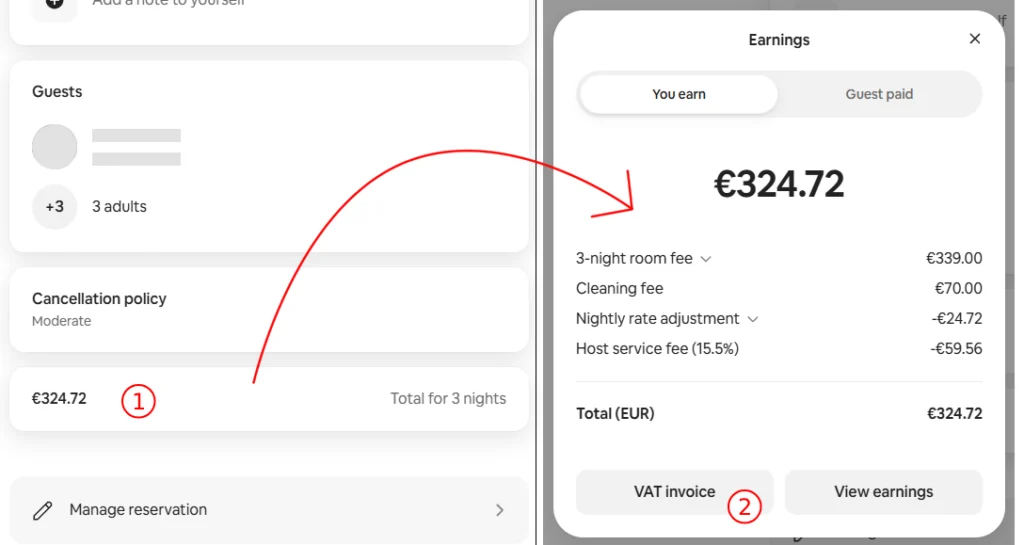
Each route, step by step, is in our guide to downloading Airbnb VAT invoices.
Getting the earnings report or CSV
For a report:
- Click Today > Menu > Earnings.
- Under Earnings, click Reports.
- Open a monthly or yearly report, or click Create report and pick the dates and listings.
- Click Get PDF report, then Download PDF or Send by email.
For the CSV, go to Earnings, click Upcoming or Paid, filter by dates, listings and earnings types, and click Export CSV. Choose what to include and click Export CSV again.
Why the numbers don’t line up
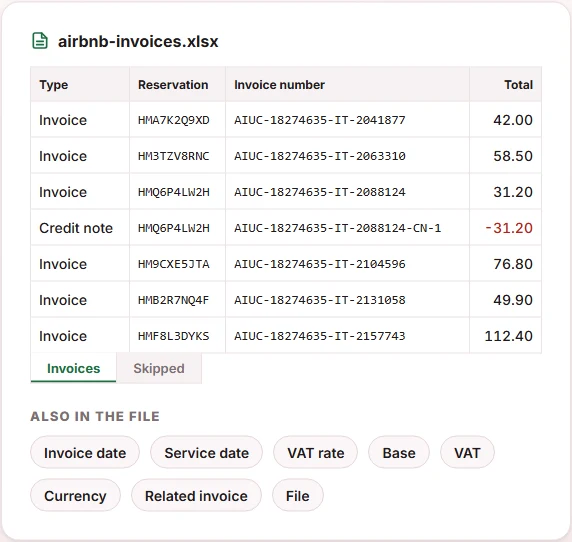
If you put a month of invoices next to a monthly report, expect differences. Airbnb’s monthly invoice download contains the reservations that start in that month, while each invoice was finalized when its reservation was accepted, which can be in an earlier month. One reservation can also carry more than one document, such as an invoice and a later credit note.
The reliable way to reconcile is by reservation code and invoice number. If you downloaded the invoice PDFs with our extension, its PDF → Excel tab puts them in one sheet, one row per document, with credit notes as negative amounts. How that works is in our guide to exporting Airbnb invoice data to Excel.
Which one to use
- What Airbnb charged you, with its VAT: the VAT invoice.
- What you earned: the earnings report, or the CSV when you need each transaction.
- A tax return: ask your accountant. Airbnb’s pages don’t say which document a tax authority accepts, and the answer depends on your country.
Whichever you need, the invoices are the ones with a deadline: 12 months. If you need them for specific reservations rather than whole months, the Airbnb EU VAT Invoice Downloader downloads them from reservation codes. It doesn’t handle earnings reports. Your first 10 invoice downloads are free, with no credit card required.
Frequently Asked Questions
Does an earnings report replace a VAT invoice?
Airbnb doesn’t say it does. Its invoice page points to the reservation receipt or the earnings breakdown only for countries where VAT invoices aren’t available. Ask your accountant which document they need.
Does the earnings report show Airbnb’s service fee?
Yes. Airbnb lists the host service fee in the report’s breakdown, and the earnings CSV has the host service fee for each transaction.
Can I get invoices older than a year?
Airbnb states that VAT invoices are available only for the past 12 months. Earnings reports go back to the year you started hosting.
Why don’t my invoice totals match my monthly report?
Airbnb’s monthly invoice download groups invoices by the month the reservation starts, and each invoice is finalized when the reservation is accepted. Compare reservation by reservation, not month by month.
Can InvoiceStack download earnings reports?
No. The extension downloads VAT invoices and credit notes from reservation codes. Earnings reports come from the Earnings section of your Airbnb account.