
It depends on what you start from. If you don’t have the invoices yet, Airbnb gives hosts a CSV of a month’s VAT invoices under Account settings > Taxes > Tax documents > Invoices, and Excel opens it. If you already have a folder of invoice PDFs, you need something that reads them, and that is what the PDF → Excel tab of our extension does.
Note: This article provides general information about exporting Airbnb invoice data and is not tax advice. VAT treatment depends on your country and individual circumstances, so you should confirm the correct treatment with your accountant or tax advisor.
Route 1: Airbnb’s invoices CSV
Airbnb’s page on locating your VAT invoice describes the bulk download for hosts, on desktop:
- Click Menu > Account settings > Taxes.
- Click Tax documents, then Invoices.
- Choose the month and CSV as the file type.
- Click Download.
Before you plan a year around this file, know its limits:
- One month per download. Twelve files for a year.
- Sorted by stay, not by invoice. The file holds the invoices of reservations that start in the month you chose.
- The past 12 months only. Older invoices are no longer available.
- Not every country. Where Airbnb doesn’t issue VAT invoices, it points to the reservation receipt or the earnings breakdown instead.
Airbnb’s page doesn’t list the columns in the file, so download one month and look at it first.
Opening it in Excel
Microsoft’s page on importing text and CSV files says that when you open a CSV directly, Excel uses its current default data format settings to read each column, so check the dates. Importing gives you a preview first:
- On the Data tab, click From Text/CSV.
- Choose the file and click Import.
- If the columns look wrong, pick another character under Delimiter and check the preview.
- Click Load.
Keep the original CSV untouched, so you can go back to it if a column converts badly.
Route 2: from PDFs, with the PDF → Excel tab
Customers of our extension had their invoices as PDFs, and kept asking us for the same data as a spreadsheet. The PDF → Excel tab of the Airbnb EU VAT Invoice Downloader is our answer:
- Open the extension panel and click the PDF → Excel tab.
- Click Choose files, or Choose folder for a whole folder.
- Check how many were processed and how many skipped. See the data opens a preview in a browser tab.
- Click Export to Excel. The button shows how many invoices go in, and the file is
airbnb-invoices.xlsx.
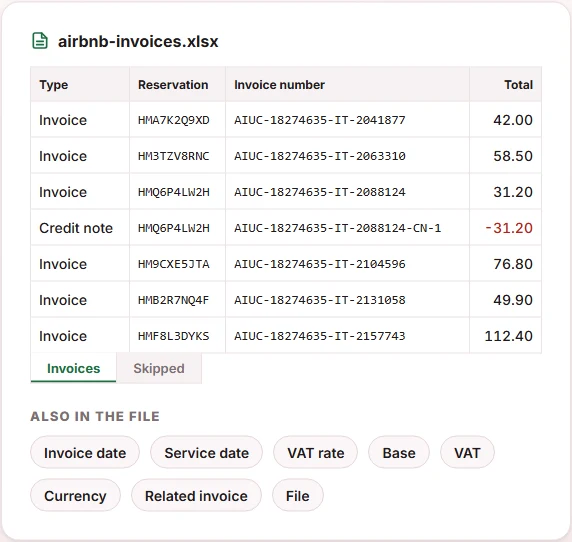
The Invoices sheet has one row per document, sorted by invoice date, with these columns: Type, Reservation, Invoice number, Invoice date, Service date, VAT rate, Base, VAT, Total, Currency, Related invoice and File. Amounts are numbers, so a column sum works. Credit notes come out negative, which means the Total column nets them off without any extra step. Older Host Invoice documents have no issue date, so their Invoice date stays empty.
What the tab reads, and what it skips
- Your files stay on your computer. The PDFs are read in the browser and nothing is sent to our server, so the tab uses no credits.
- It is made for the PDFs the extension downloads. The panel says so, and warns that PDFs saved another way may not be read.
- Some files go to the Skipped sheet, each with its reason: a scanned PDF with no text, a document that isn’t an Airbnb invoice, no invoice number found, amounts that don’t add up at the VAT rate, or a file that couldn’t be opened.
- Duplicates count once. The same invoice saved twice under different names is read once; the copy goes to Skipped.
- Euros only. It reads amounts in euros, and the Currency column always says EUR.
If the VAT rate column shows 0, our article on what 0% VAT on an Airbnb invoice means covers what Airbnb says about it.
When you need the fee beside each earning
That is a different file. The earnings CSV from Airbnb’s page on downloading your earnings lists each transaction with the host service fee, the cleaning fee if you charge one, gross earnings and taxes withheld. Go to Today > Menu > Earnings, click Upcoming or Paid, filter, and click Export CSV. It is earnings data, not a set of invoices.
Which route to start from
- No PDFs, and a month at a time suits you: Airbnb’s invoices CSV.
- A folder of PDFs from the extension: the PDF → Excel tab.
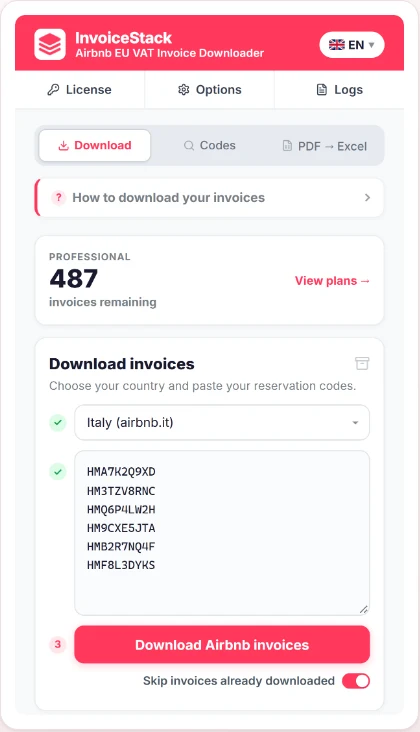
- No PDFs, and you need specific reservations: download them first. The Download tab takes reservation codes and saves each invoice and credit note as a PDF, at one credit per PDF; if a PDF can’t be built, no credit is used. If you don’t have the codes, here is how to find Airbnb reservation codes.
Your first 10 invoice downloads are free, with no credit card required.
Frequently Asked Questions
Does the PDF → Excel tab use credits?
No. It reads the PDFs in your browser and sends nothing to our server. Credits are used only when the Download tab creates an invoice PDF.
Can it read invoice PDFs I saved from Airbnb myself?
The panel says it is made for the invoices the extension downloads, and that PDFs saved another way may not be read. Try a few and look at the Skipped sheet.
Can I download a whole year of invoices from Airbnb at once?
Airbnb’s bulk download works one month at a time, and VAT invoices are available only for the past 12 months, so a year means twelve downloads.
Does it work with invoices in other currencies?
No. It reads amounts in euros, and the Currency column always says EUR. Check any other invoice against its PDF.
What if the same invoice is in my folder twice?
It is counted once. The second file with the same invoice number goes to the Skipped sheet as a duplicate, so it doesn’t inflate the totals.