
Your accountant needs three things from you: every invoice for the period, a way to find any one of them by date or order number, and a list of the orders that have no invoice yet. One folder per month and the order number in every file name cover the first two. A short list covers the third.
These are suggestions, not rules from Amazon or a tax authority. Adapt them to what your accountant asks.
Note: This article provides general information about organizing Amazon invoices and is not tax advice. VAT treatment depends on your country and individual circumstances, so you should confirm the correct treatment with your accountant or tax advisor.
Before you download: four questions
Ask these first: renaming a year of files because the answer was different is slow work.
- Period: monthly, quarterly or the whole year?
- Which date: order date or the date on the invoice?
- Which documents: invoices only, or order summaries for orders without one? Amazon’s UK page on printing an invoice treats them as two different documents.
- How to send: a shared folder, a ZIP file, or an upload to their software?
On dates: Amazon makes the invoice available once the order is dispatched, so an order placed on 31 March can carry an April date on its invoice. Pick one date for your folders and tell your accountant which.
Folders: one per month
Amazon/
  2026/
    03/
    04/
Month folders still work for a quarterly accountant: three folders make a quarter. If you buy on more than one Amazon store, add the store above the year, as in Amazon/Germany/2026/03/, so invoices from two countries don’t mix.
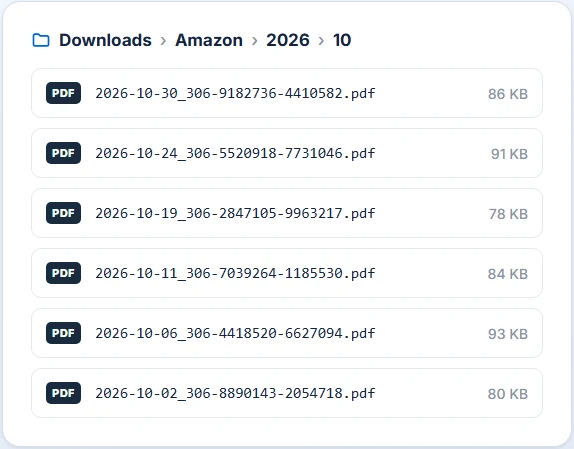
File names: date first, then the order number
A name like 2026-03-14_302-1234567-1234567.pdf sorts by date and leads straight back to the order in Your Orders. A few habits keep it that way:
- Year, month, day, in that order, so files sort by date.
- The order number in every name. It identifies the order on Amazon, so anyone can look it up.
_1,_2for several invoices of one order. Amazon’s German help page says invoices are created per delivery, so one order can have more than one.- A label for what isn’t an Amazon invoice, such as
_summaryor_seller, so nobody has to open it to know. - Plain characters only. Windows doesn’t allow characters such as
:,?or*in file names.
The list of what’s missing
A gap in a folder says nothing on its own: no purchase that week, or a purchase without an invoice? A small spreadsheet answers it. Four columns are enough: order number, store, order date, status. Statuses like “asked the seller on 5 March” or “summary only” tell your accountant what to expect.
Some gaps are normal. Marketplace sellers send their own invoices, gift cards come without an itemised VAT invoice, and gift orders go through Amazon. Our article on what to do when an Amazon invoice isn’t available goes through each case.
What to send
- The folder for the period.
- The missing list, with the date you last checked it.
- One line saying which stores and which date the folders use.
Keep your own copy. Amazon’s page on closing an account says that once an account is closed you can’t access your order history or print an invoice, and recommends downloading any invoices you might need first.
Letting the extension name the files
Naming by hand is fine for twenty orders. For a year, the Amazon Invoice Downloader applies the pattern as it saves each PDF. Under Options, Download preferences, you build the File name from the order number, year, month and day, and the Folders structure from year and month, with any text of your own around them. A preview shows the result before you download.
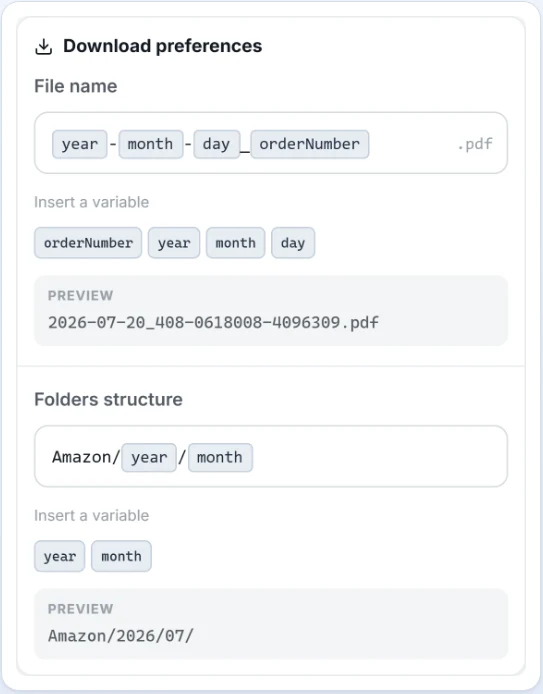
The dates are the order’s, not the invoice’s, so tell your accountant the folders follow the order date. The periods are fixed (last 30 days, last 3 months, a calendar year or an older year), so for one quarter you download the year, using credits for all of it, and hand over three month folders. Each PDF saved uses one credit.
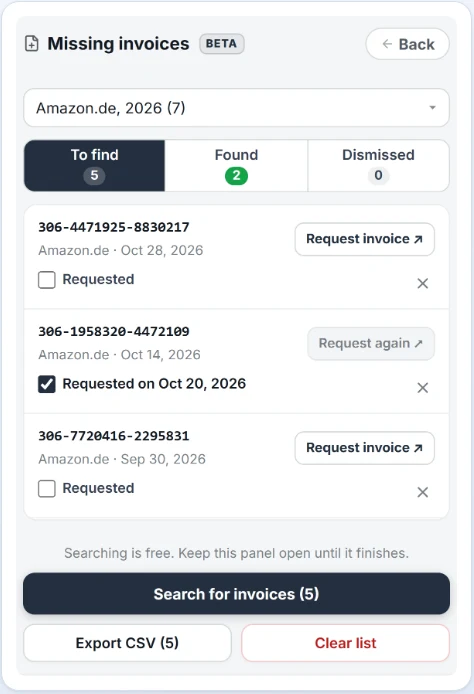
The extension also keeps a Missing invoices list for orders Amazon showed no invoice for, with the store, the date and whether you’ve asked the seller. Export CSV saves it as a file, which can be the start of your missing list. It’s still in testing, so check it against your orders before you send it.
You can try it on your first 5 invoices for free, with no credit card required. For the download itself, see how to download all Amazon invoices at once.
Frequently Asked Questions
Should I file by order date or by invoice date?
Ask your accountant. An order placed on the last day of a month can ship in the next one, and Amazon makes the invoice available after dispatch, so the two dates can fall in different months.
One order has two invoices. Is that a mistake?
Usually not. Several of Amazon’s European help pages, Germany’s among them, say invoices are created per delivery, so an order shipped in two parts can have two.
How long should I keep the invoices?
It depends on your country, so ask your accountant. Keep your own copy in any case: Amazon says that once an account is closed, you can’t access your order history or invoices.
Can the extension put the invoice number or the amount in the file name?
No. It doesn’t read the content of the PDF. File names can use the order number and the order’s year, month and day, plus any text you type.