
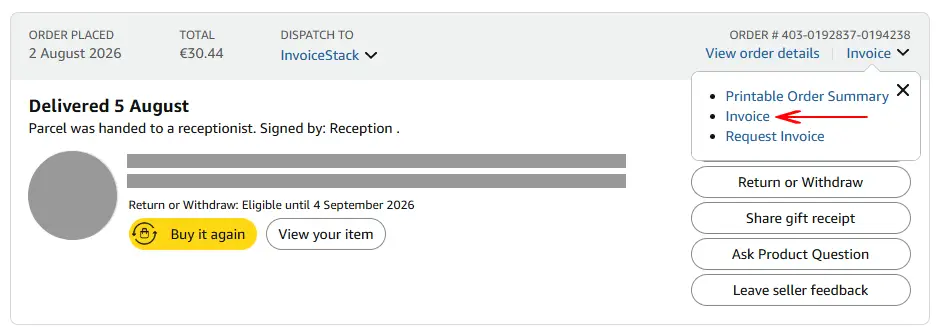
The VAT invoice is the tax document for your purchase; the order summary is a printable record of the order. Amazon offers both from the same Invoice menu, and the summary is there for any order, while the invoice appears only once the order has shipped and only if Amazon, or the seller through Amazon, issued one. If you need the document for VAT, look for Print Invoice first, and ask your accountant before using a summary instead.
Note: This article provides general information about Amazon VAT invoices and order summaries and is not tax advice. VAT treatment depends on your country and individual circumstances, so you should confirm the correct treatment with your accountant or tax advisor.
Side by side
From Amazon’s UK page on printing an invoice and the same page on the Irish, Dutch, Swedish and Belgian stores:
| VAT invoice | Order summary | |
|---|---|---|
| Label on the order | Print Invoice (UK), VAT Invoice (Ireland, Netherlands, Sweden, Belgium) | Order Summary (UK), Printable Order Summary (Ireland, Netherlands, Sweden, Belgium) |
| Available for | Eligible orders, once dispatched | Any order sold on the store |
| Depends on the seller | Yes: from a Marketplace seller it shows only in some cases, otherwise you ask the seller | No |
| Order with no invoice | Not shown | The only option shown in Ireland, the Netherlands, Sweden and Belgium |
| In bulk on Amazon Business | Get order documents, Invoices | Get order documents, Printable order summary |
The last row comes from Amazon’s Business Analytics page, where the two are separate choices in the same download.
What a VAT invoice has to show in the UK
HMRC’s record-keeping guidance, VAT Notice 700/21, lists what a VAT invoice must show. Shortened:
- a sequential number that identifies the document
- the time of supply, and the date of issue if different
- the supplier’s name, address and VAT registration number
- the customer’s name and address
- a description of the goods, with quantity, VAT rate and amount excluding VAT
- the total amount of VAT
For supplies of £250 or less including VAT, the same notice allows a simplified invoice with fewer details, so one missing line doesn’t settle the question on its own. On reclaiming, HMRC’s page on keeping VAT records is direct: you cannot reclaim VAT using an invalid invoice, a pro-forma invoice, a statement or a delivery note. It doesn’t mention Amazon order summaries, and Amazon’s pages don’t say a summary can stand in for an invoice. Ask your accountant rather than assuming either way.
Other countries set their own rules.
How to tell which file you have
- Check the button you used. If you saved it yourself, you know. If someone sent it to you, open the order and compare.
- Read the title at the top of the document. Wording varies by store and language.
- Look for the supplier’s VAT number and the VAT amount. A full UK VAT invoice shows both, as the list above says.
- Count the pages on a Belgian invoice. Amazon’s Belgian page says every invoice PDF has two pages, Dutch and then French: same invoice, not two.
Italy adds a third document
Amazon’s Italian help page puts three things under Invoice/Receipt: the invoice, or a readable copy of it, the purchase receipt, and the order summary. For goods sold and shipped by Amazon within Italy, between a supplier and a customer both established there, the original invoice goes through the Sistema di Interscambio and what you print may be a copy. In all other cases the page says the invoice is a PDF in your orders. If your file says “receipt”, ask your accountant whether it’s enough for what you need.
Downloading only the invoices
When you download a whole period, the summaries are noise. The Amazon Invoice Downloader saves only the invoice PDFs. On Personal accounts the summary is a web page and is left alone; on Amazon Business, where the summary is also a PDF, it is recognised and left out too, so it never uses a credit.
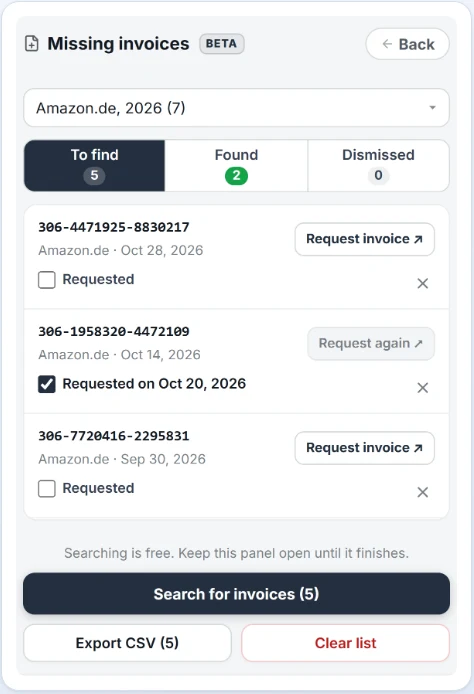
An order that offers only a summary has no invoice to download. It goes on the extension’s Missing invoices list (a feature still in testing), so you can ask the seller from there. Our article on what to do when an Amazon invoice isn’t available covers the request.
You can try it on your first 5 invoices for free, with no credit card required.
Frequently Asked Questions
Can I reclaim VAT with an Amazon order summary?
The Amazon and HMRC pages read for this article don’t say a summary can be used. HMRC says you cannot reclaim VAT using an invalid invoice, a pro-forma invoice, a statement or a delivery note. Ask your accountant before relying on a summary.
Why do I see an order summary but no invoice?
The summary is available for any order, while the invoice depends on who sold the item and whether the order has shipped. On a Marketplace order, Amazon says to ask the seller with Request Invoice.
What is the purchase receipt on Amazon Italy?
Amazon’s Italian help page lists it as a third document, next to the invoice and the order summary, under the Invoice/Receipt button. Its VAT page describes it as the document consumers keep for warranty requests.
Does the extension download order summaries?
No. It saves only invoice PDFs. An order that offers only a summary goes on its Missing invoices list and uses no credit.