
The purchase receipt is a copy of the order as Temu shows it, delivery details included. The accounting document drops the delivery details, puts your own buyer details at the top and gives the PDF a number from your own sequence. Temu Invoice Generator creates both from the same order data, and neither is an invoice issued by Temu.
Note: This article provides general information about Temu purchase receipts and accounting documents and is not tax advice. VAT treatment depends on your country and individual circumstances, so you should confirm the correct treatment with your accountant or tax advisor.
Line by line
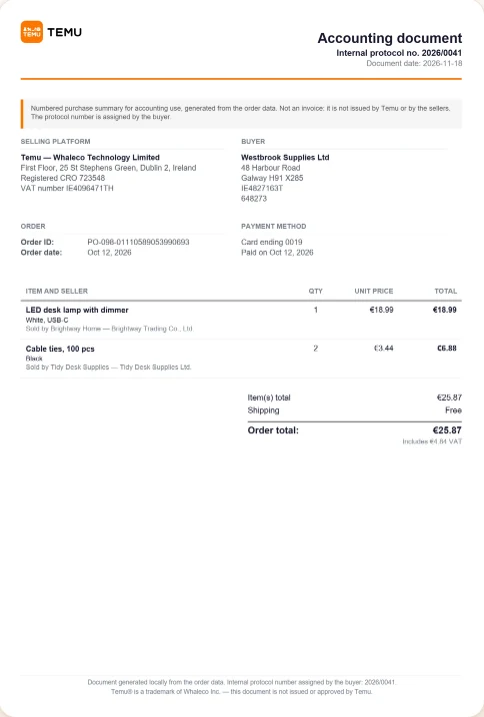
| Purchase receipt | Accounting document | |
|---|---|---|
| Title | Purchase receipt | Accounting document |
| Your number | None | Internal protocol no., at the top and in the footer |
| Order ID and order date | Yes | Yes |
| Date the PDF was made | No | Document date |
| Statement of what it is | No | Yes, in a box under the header |
| Platform company | No | Selling platform: Whaleco Technology Limited, Dublin |
| Buyer | Shipping address, with name and phone; billing address when the order has one | Only what you typed in Buyer details |
| Shipping date | Yes | No |
| Payment method and date paid | Yes | Yes |
| Items, quantity, unit price, line total | Yes | Yes |
| Seller under each item | Sold by trader, plus Business Name | Sold by |
| Temu’s totals and VAT line | Yes | Yes |
| Footer | Generated by InvoiceStack | Generated locally from the order data; not issued or approved by Temu |
Both follow the same two settings: Document logo (the Temu logo or none) and Hide item details, which removes the item table.
The VAT line and the totals
Neither document calculates VAT. The VAT line is Temu’s own text, copied from the order data; when the data has no VAT information, the line reads “VAT not stated in the order data”. The summary rows and the order total are Temu’s too. The only figure the extension works out is each line total, unit price times quantity.
Where the accounting document gets its details
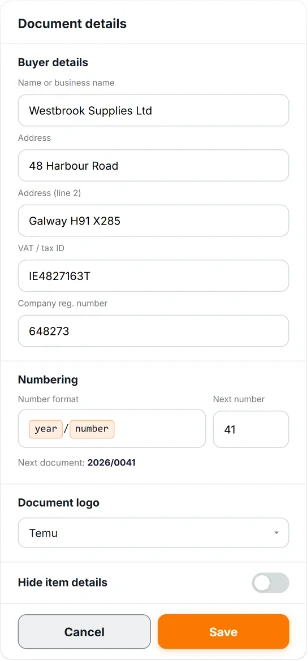
On the Accounting document tab, the buyer row opens Document details: Name or business name (required before a search can start), Address, Address (line 2), VAT / tax ID and Company reg. number. Empty fields are left off the PDF, and the extension doesn’t check what you type. The numbering is set in the same window; our guide on how to number Temu accounting documents covers it.
The statement box reads: “Numbered purchase summary for accounting use, generated from the order data. Not an invoice: it is not issued by Temu or by the sellers. The protocol number is assigned by the buyer.” The number is there to track the expense in your own records. It doesn’t make the PDF a tax document.
Which one you need
- A copy of the order for your own files: the purchase receipt. It keeps the delivery details.
- A numbered record per purchase, under your company name: the accounting document.
- No home address or phone number on the page: the accounting document.
- An invoice from Temu or a seller: neither. Temu’s Terms of Use mention only an order summary for shoppers; see whether Temu provides VAT invoices.
If the documents are for your bookkeeping, create one of each for a single order and show both to your accountant before you run a whole year. We haven’t heard yet whether accountants accept them, so that sample is worth the two credits. You can try it with your first 5 Temu documents for free, with no credit card required.
Frequently Asked Questions
Is either document an invoice issued by Temu?
No. Both are generated by the extension from your Temu order data. Neither is issued by Temu or by the sellers, and the accounting document says so on its face.
Does the accounting document show my home address?
No. It leaves out the shipping address, phone number and shipping date, and prints only the buyer details you typed.
Can I create both for the same order?
Yes. Run the order once on each tab. On the second run the order starts unticked, marked as already downloaded, so tick it. Each PDF uses one credit.
Which language are the documents in?
The language of your Temu account’s receipt page, not the panel’s. If that language isn’t one of the 11 the extension supports, the labels are printed in English.